Add your guesses
Use the grid for the rows you have already played.
Enter your guesses, mark the tile colors, and narrow the five-letter words that still fit your board.
Leave unused rows blank. The solver only reads the letters and colors you set.
Enter a guess, set the colors, then show the words that still fit.
These words are shown as a shortlist for comparing guesses. We do not open a separate page for every possible word here. If you want a meaning, use the Word Definition Lookup.
Add one or two real guesses, match the colors, then use the shortlist to decide whether to guess the answer or test fresh letters.
Use the grid for the rows you have already played.
Tap a tile until it matches what you see on your board.
Compare the shortlist, then choose an answer guess or a word that tests new letters.
Start with the count, then check the colors. A short list is for choosing an answer. A long list is a sign to gather one more clue.
A few possible words means compare answers. A big list means play for information.
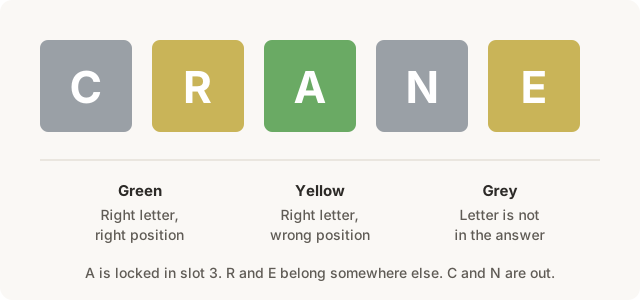
Make every green, yellow, and gray tile match your board before trusting the list.
One gray copy can mean no extra copies, not zero copies.
Keep that letter exactly where it is.
Use the letter, but move it somewhere else.
Remove it unless another copy is green or yellow.
Filter for letters worth testing, or play a word that removes several candidates.
If a word looks missing, recheck the row with the repeated letter.
When only a few words remain, choose the one that feels most natural.
Use these examples when a result looks surprising or a repeated letter makes the board harder to read.
The solver turns green tiles into fixed positions, yellow tiles into present-but-not-here rules, and gray tiles into exclusions. It filters five-letter candidates from WordyLab's word-game data, then sorts the remaining words with common, useful letters near the top. Different games and archives can use different answer lists, so confirm your final play in the game.
Use it after you have real color feedback from your board. Enter your guesses, match the tile colors, then compare the remaining words before choosing your next move.
Type letters into the grid, then tap each tile to cycle through empty, green, yellow, and gray states.
The solver uses WordyLab's word-game data to filter likely five-letter candidates. Use it to narrow your board, then confirm your final guess in the game.
Enter every repeated-letter row with its colors. If one E is green and another E is gray, WordyLab treats that as an exact-count clue instead of letting unlimited E words through.
Not always. If many words are still possible, a different guess may reveal more useful letters than an immediate answer attempt.