Enter your letters
Type the tiles or letters you're working with. Use ? for each blank tile. Up to 20 letters accepted.
Enter mixed letters, add ? for blanks, and narrow the words that still fit
your rack, jumble, or anagram clue.
Use one ? for each blank tile. Spaces and punctuation are ignored.
Enter up to 20 letters. Repeated letters only count as many times as they appear.
Enter letters above, or try an example set.
Start broad, then tighten by length or score. Longer results show first by default, but short words can be the best play on a crowded board.
Type the tiles or letters you're working with. Use ? for each blank tile. Up to 20 letters accepted.
Pick a minimum and maximum word length. Sort by length, Scrabble base score, or alphabetically — whatever fits your situation.
Use the results as your shortlist. Longer words are shown first by default. Confirm your final pick against the dictionary your specific game uses.
The list is only useful when you can act on it. Start with length, then check blanks, score, and the dictionary rules for the game you are playing.
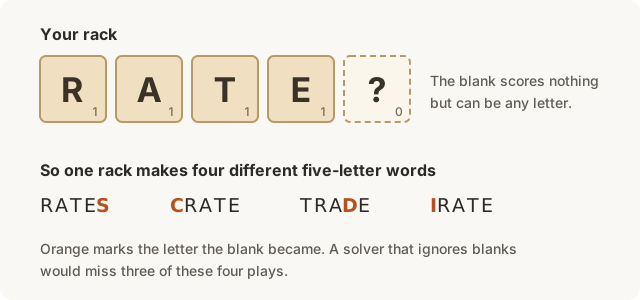
Long results are grouped first by default so bingo plays and full answers surface quickly.
A single ? can multiply the results. Set a target length before sorting by score.
Scores are base letter values, so check board bonuses and app dictionaries before you commit.
Two Es in your input can be used twice. One E can only be used once.
Each ? stands for one unknown letter, not unlimited missing letters.
Use min and max length when a rack produces too many good options.
Lower the max length or sort by score when the first list is too broad.
Switch to Anagram Solver when every letter must be used exactly once.
Use Pattern Matcher when you know the shape of the answer.
Use this part when a result looks promising but you want to make sure it fits the puzzle, rack, or game you are playing.
These examples show how to read the result list without getting lost in every possible word.
A repeat letter, blank tile, or pasted symbol can change what appears.
The short version:
WordyLab cleans the letters you enter, expands each ? as a wildcard, checks possible matches against its word-game data, and groups results by length. Base scores help compare options, but board bonuses and app-specific dictionary rules should still be checked in the game you are playing.
It turns the letters you enter into a list of valid word options. Use it for Scrabble-style racks, jumbles, anagrams, and any puzzle where you know the letters but not the word yet.
Yes. Enter ? for each blank tile. The solver treats each ? as one wildcard letter, then shows words that can be made from the full set.
WordyLab uses English word-game data and base Scrabble-style letter scores. For tournament play or a specific app, confirm the final word in the dictionary that game uses.
The sort menu changes the order. Length helps you scan longer plays first, score helps compare tile value, and alphabetical order is useful when you are checking a specific word.